HeyProData - Professional Networking Platform

HeyProData is a comprehensive crew-side ecosystem designed to connect professionals in film, media, and events across the MENA region. Built with a modern Next.js 15 architecture, it provides a trusted space for creatives to showcase their portfolios, discover gigs, collaborate on projects, and interact directly with decision-makers. The platform features robust role-based profiles, a dynamic jobs hub, social feeds, and real-time connectivity.

Full-StackNext.js 15TypeScriptSupabaseTailwind CSSPostgreSQL
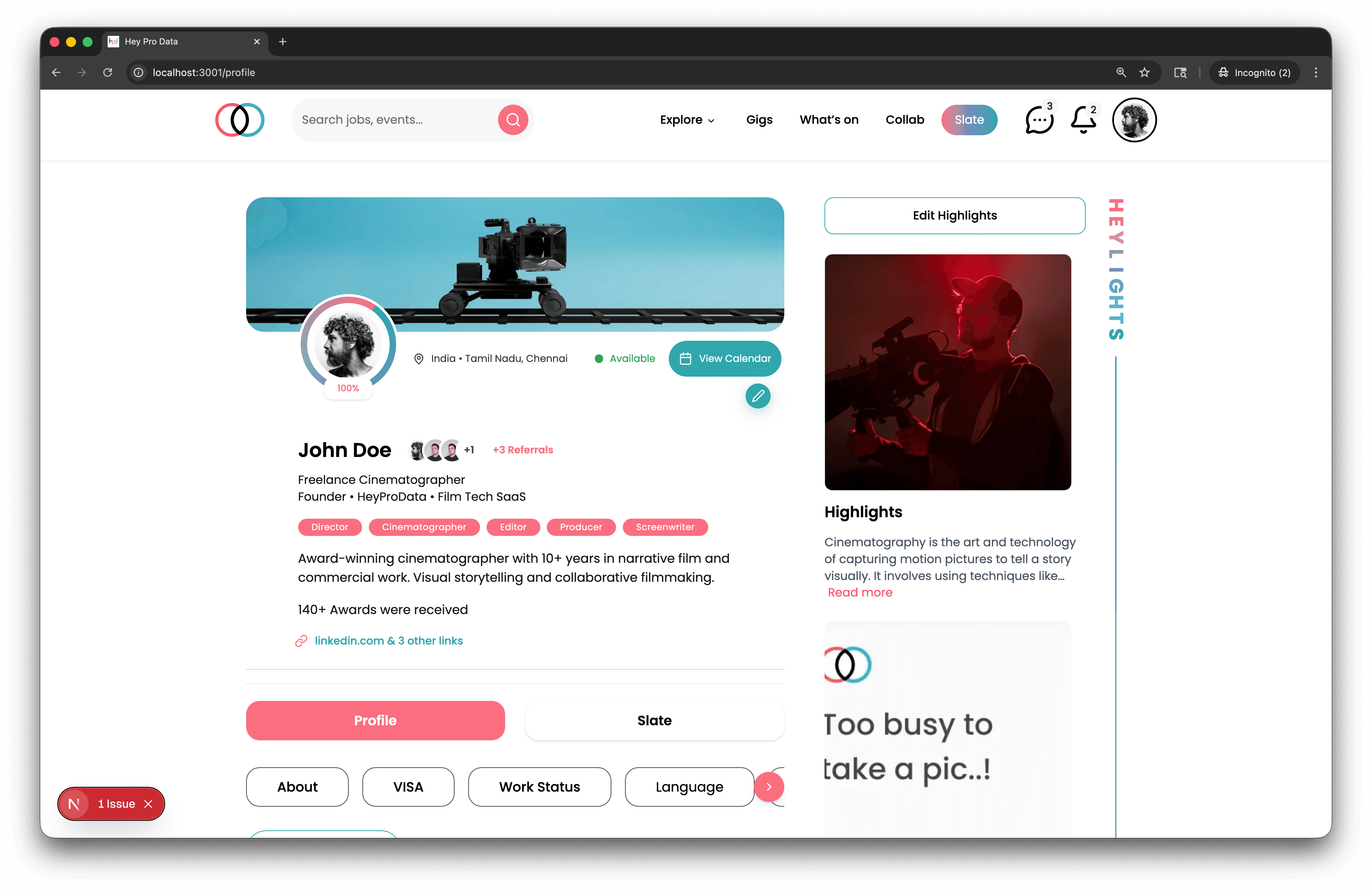
HeyProData - Professional Networking Platform preview

HeyProData - Professional Networking Platform

Version: 2.7
Last Updated: January 2025
Tech Stack: Next.js 15 (App Router) + TypeScript + Supabase + Tailwind CSS


šŸ“‹ Table of Contents


šŸŽÆ Project Overview

HeyProData is a professional networking and marketplace platform designed specifically for the film, media, and creative industries. It connects artists, producers, filmmakers, actors, crew members, and production professionals for collaboration and hiring opportunities.

Core Functionality

  • Professional Profiles: Showcase portfolios, skills, credits, and availability
  • Gigs & Jobs Marketplace: Post and apply for production opportunities
  • Collab Platform: Collaborative project creation and team formation
  • Slate Social Feed: Industry-focused social media features
  • What's On Events: Industry events with RSVP management
  • Explore/Crew Directory: Search and filter professionals by role, location, and skills
  • Real-time Notifications: Track applications, interests, and interactions

šŸ›  Tech Stack

Frontend

  • Framework: Next.js 15.5.4 (App Router with Turbopack)
  • Language: TypeScript 5
  • UI Library: React 19.2.0
  • Styling: Tailwind CSS 4 + PostCSS
  • UI Components: Radix UI primitives (Accordion, Dialog, Dropdown, Select, etc.)
  • Icons: Lucide React, Tabler Icons
  • State Management: React Context API (AuthContext)
  • HTTP Client: Axios 1.12.2
  • Date Handling: date-fns 4.1.0
  • Drag & Drop: @dnd-kit/core
  • Forms: React Day Picker
  • Notifications: Sonner (toast notifications)

Backend

  • API: Next.js API Routes (App Router)
  • Authentication: Supabase Auth with JWT tokens
  • Database: Supabase (PostgreSQL)
  • Storage: Supabase Storage (file uploads)
  • Validation: Custom server-side validation
  • Middleware: Next.js middleware for route protection

Development Tools

  • Linting: ESLint 9 with Next.js config
  • Package Manager: Yarn (lockfile present)
  • Build Tool: Next.js with Turbopack

šŸ— Project Architecture

Application Structure

terminal
HeyProData/ ā”œā”€ā”€ /app/ # Next.js App Router directory │ ā”œā”€ā”€ (app)/ # Authenticated app routes (with layout) │ ā”œā”€ā”€ (auth)/ # Authentication routes (login, signup, etc.) │ ā”œā”€ā”€ layout.tsx # Root layout │ └── globals.css # Global styles │ ā”œā”€ā”€ /api/ # API routes (73 endpoints) │ ā”œā”€ā”€ /health/ # Health check │ ā”œā”€ā”€ /profile/ # User profile management (10 endpoints) │ ā”œā”€ā”€ /skills/ # Skills management │ ā”œā”€ā”€ /availability/ # Availability calendar │ ā”œā”€ā”€ /gigs/ # Gigs marketplace │ ā”œā”€ā”€ /collab/ # Collaboration platform │ ā”œā”€ā”€ /slate/ # Social media feed │ ā”œā”€ā”€ /whatson/ # Events management │ ā”œā”€ā”€ /explore/ # Crew directory │ ā”œā”€ā”€ /projects/ # Design projects │ ā”œā”€ā”€ /notifications/ # Notifications │ ā”œā”€ā”€ /upload/ # File uploads (6 types) │ └── ... # Other modules │ ā”œā”€ā”€ /components/ # Reusable React components │ ā”œā”€ā”€ /ui/ # Shadcn UI components (28 components) │ ā”œā”€ā”€ /header/ # Header component │ ā”œā”€ā”€ /modules/ # Feature-specific modules │ ā”œā”€ā”€ /profile/ # Profile components │ └── /jobs/ # Job-related components │ ā”œā”€ā”€ /lib/ # Utility libraries │ ā”œā”€ā”€ /supabase/ # Supabase client & server utilities │ ā”œā”€ā”€ apiCalling.ts # API helper functions │ ā”œā”€ā”€ axios.ts # Axios configuration │ └── utils.ts # General utilities │ ā”œā”€ā”€ /contexts/ # React Context providers │ └── AuthContext.tsx # Authentication context │ ā”œā”€ā”€ /types/ # TypeScript type definitions │ └── index.ts # Shared types │ ā”œā”€ā”€ /data/ # Mock/sample data │ ā”œā”€ā”€ collabPosts.ts │ ā”œā”€ā”€ exploreProfiles.ts │ ā”œā”€ā”€ gigs.ts │ └── ... │ ā”œā”€ā”€ /documentation/ # Technical documentation │ ā”œā”€ā”€ /API-Docs/ # API documentation │ └── /backend-documentation-and-commands/ # Module-specific docs │ ā”œā”€ā”€ /public/ # Static assets │ ā”œā”€ā”€ /assets/ # Images and media │ └── /logo/ # Branding assets │ ā”œā”€ā”€ middleware.ts # Authentication & routing middleware ā”œā”€ā”€ next.config.ts # Next.js configuration ā”œā”€ā”€ tailwind.config.js # Tailwind CSS configuration └── package.json # Dependencies

šŸ“ File Structure

Root Level Files

FilePurpose
terminal
middleware.ts
Route protection, authentication checks, session management
terminal
next.config.ts
Next.js configuration (Turbopack, images, etc.)
terminal
tailwind.config.js
Tailwind CSS theme and plugin configuration
terminal
tsconfig.json
TypeScript compiler configuration
terminal
eslint.config.mjs
ESLint rules configuration
terminal
postcss.config.mjs
PostCSS configuration for Tailwind
terminal
components.json
Shadcn UI component configuration
terminal
package.json
Project dependencies and scripts
terminal
.env.sample
Environment variables template

Key Directories

terminal
/app/
- Frontend Pages

terminal
/app/ ā”œā”€ā”€ (app)/ # Protected routes (requires auth) │ ā”œā”€ā”€ page.tsx # Home/Explore page │ ā”œā”€ā”€ create/page.tsx # Create content page │ │ │ ā”œā”€ā”€ (explore)/ # Crew directory │ │ └── explore/ │ │ ā”œā”€ā”€ page.tsx # Explore listing │ │ └── [slug]/page.tsx # User profile view │ │ │ ā”œā”€ā”€ (gigs)/ # Gigs marketplace │ │ └── gigs/ │ │ ā”œā”€ā”€ page.tsx # Gigs listing │ │ ā”œā”€ā”€ [slug]/page.tsx # Gig details │ │ └── manage-gigs/ # Gig management │ │ │ ā”œā”€ā”€ (collab)/ # Collaboration platform │ │ └── collab/ │ │ ā”œā”€ā”€ page.tsx # Collab feed │ │ └── manage-collab/ # Collab management │ │ │ ā”œā”€ā”€ (slate-group)/ # Social feed │ │ └── slate/page.tsx # Slate feed │ │ │ ā”œā”€ā”€ (whatson)/ # Events platform │ │ └── whats-on/ │ │ ā”œā”€ā”€ page.tsx # Events listing │ │ ā”œā”€ā”€ [slug]/page.tsx # Event details │ │ └── manage-whats-on/ # Event management │ │ │ ā”œā”€ā”€ jobs/ # Jobs hub │ │ ā”œā”€ā”€ page.tsx # Jobs listing │ │ └── (jobs)/ │ │ ā”œā”€ā”€ gig/[id]/ # Gig job details │ │ └── project/[id]/ # Project job details │ │ │ └── profile/ # User profile │ └── page.tsx # Profile page with 20+ components │ └── (auth)/ # Public auth routes ā”œā”€ā”€ login/page.tsx # Login page ā”œā”€ā”€ signup/page.tsx # Registration page ā”œā”€ā”€ otp/page.tsx # OTP verification ā”œā”€ā”€ callback/page.tsx # OAuth callback ā”œā”€ā”€ forget-password/page.tsx # Password reset request ā”œā”€ā”€ reset-password/page.tsx # Password reset form └── form/page.tsx # Additional form page

terminal
/components/
- React Components

terminal
/components/ ā”œā”€ā”€ /ui/ # Shadcn UI components (28 components) │ ā”œā”€ā”€ button.tsx # Button component │ ā”œā”€ā”€ dialog.tsx # Modal/Dialog │ ā”œā”€ā”€ dropdown-menu.tsx # Dropdown menus │ ā”œā”€ā”€ input.tsx # Form inputs │ ā”œā”€ā”€ select.tsx # Select dropdown │ ā”œā”€ā”€ calendar.tsx # Date picker │ ā”œā”€ā”€ card.tsx # Card container │ ā”œā”€ā”€ avatar.tsx # User avatar │ ā”œā”€ā”€ badge.tsx # Badge/tag component │ ā”œā”€ā”€ checkbox.tsx # Checkbox input │ ā”œā”€ā”€ accordion.tsx # Accordion/collapse │ ā”œā”€ā”€ navigation-menu.tsx # Navigation component │ ā”œā”€ā”€ scroll-area.tsx # Scrollable container │ ā”œā”€ā”€ separator.tsx # Divider line │ ā”œā”€ā”€ skeleton.tsx # Loading skeleton │ ā”œā”€ā”€ sonner.tsx # Toast notifications │ └── ... # 13 more UI components │ ā”œā”€ā”€ /header/ # Header components │ └── index.tsx # Main header │ ā”œā”€ā”€ /modules/ # Feature modules │ ā”œā”€ā”€ /common/ │ │ └── projectCard.tsx # Project card component │ └── /pages/ │ └── explore-page.tsx # Explore page module │ ā”œā”€ā”€ /profile/ # Profile-specific components │ ā”œā”€ā”€ Card.tsx # Profile card │ └── personalDetails.tsx # Personal details section │ ā”œā”€ā”€ /jobs/ # Job-related components │ └── JobList.tsx # Job listing component │ ā”œā”€ā”€ /Providers/ # Context providers │ └── index.tsx # Provider wrapper │ ā”œā”€ā”€ icons.tsx # Icon components └── logo.tsx # Logo component

terminal
/lib/
- Utility Libraries

terminal
/lib/ ā”œā”€ā”€ /supabase/ │ ā”œā”€ā”€ client.ts # Browser-side Supabase client │ └── server.ts # Server-side Supabase client + helpers │ ā”œā”€ā”€ createServerClient() # Create server client │ ā”œā”€ā”€ validateAuthToken() # Token validation │ ā”œā”€ā”€ getUserFromRequest() # Extract user from request │ ā”œā”€ā”€ successResponse() # Standard success response │ ā”œā”€ā”€ errorResponse() # Standard error response │ └── hasCompleteProfile() # Profile completeness check │ ā”œā”€ā”€ apiCalling.ts # API helper functions ā”œā”€ā”€ axios.ts # Axios instance configuration ā”œā”€ā”€ countries.ts # Country data (18KB) └── utils.ts # General utility functions

šŸ”Œ API Structure

API Statistics

  • Total Endpoints: 73 routes
  • Total Modules: 15
  • Authentication Required: 60+ endpoints
  • Public Endpoints: 10+ endpoints

API Modules Overview

1. Health Check (1 endpoint)

terminal
GET /api/health # API health check

2. Profile Management (10 endpoints)

terminal
GET /api/profile # Get user profile PATCH /api/profile # Update user profile GET /api/profile/check # Check profile completion GET /api/profile/links # Get social media links POST /api/profile/links # Add social link PATCH /api/profile/links # Update social link DELETE /api/profile/links # Delete social link GET /api/profile/roles # Get professional roles POST /api/profile/roles # Add role DELETE /api/profile/roles # Delete role GET /api/profile/languages # Get languages POST /api/profile/languages # Add language PATCH /api/profile/languages # Update language DELETE /api/profile/languages # Delete language GET /api/profile/visa # Get visa information POST /api/profile/visa # Add visa info PATCH /api/profile/visa # Update visa info GET /api/profile/travel-countries # Get travel countries POST /api/profile/travel-countries # Add travel country DELETE /api/profile/travel-countries # Delete travel country GET /api/profile/credits # Get work history POST /api/profile/credits # Add credit PATCH /api/profile/credits # Update credit DELETE /api/profile/credits # Delete credit GET /api/profile/highlights # Get profile highlights POST /api/profile/highlights # Add highlight PATCH /api/profile/highlights # Update highlight DELETE /api/profile/highlights # Delete highlight GET /api/profile/recommendations # Get recommendations POST /api/profile/recommendations # Add recommendation DELETE /api/profile/recommendations # Delete recommendation

3. Skills Management (3 endpoints)

terminal
GET /api/skills # Get user skills POST /api/skills # Add skill PATCH /api/skills/[id] # Update skill DELETE /api/skills/[id] # Delete skill

4. Availability Management (4 endpoints)

terminal
GET /api/availability # Get availability calendar POST /api/availability # Set availability GET /api/availability/check # Check availability conflicts PATCH /api/availability/[id] # Update availability status

5. Notifications (3 endpoints)

terminal
GET /api/notifications # Get user notifications PATCH /api/notifications/[id]/read # Mark as read PATCH /api/notifications/mark-all-read # Mark all as read

6. Contacts Management (3 endpoints)

terminal
POST /api/contacts # Add contact to gig GET /api/contacts/gig/[gigId] # Get gig contacts DELETE /api/contacts/[id] # Delete contact

7. Referrals (2 endpoints)

terminal
GET /api/referrals # Get referrals POST /api/referrals # Create referral

8. File Uploads (6 endpoints)

terminal
POST /api/upload/resume # Upload resume (5MB, PDF/DOC/DOCX) POST /api/upload/portfolio # Upload portfolio (10MB, PDF/Images/Videos) POST /api/upload/profile-photo # Upload profile photo (2MB, JPEG/PNG/WebP) POST /api/upload/collab-cover # Upload collab cover (5MB, JPEG/PNG) POST /api/upload/slate-media # Upload slate media (10MB, Images/Videos) POST /api/upload/project-asset # Upload project asset (20MB, Multiple types)

9. Gigs & Jobs Marketplace (6 endpoints)

terminal
GET /api/gigs # List gigs (with filters) POST /api/gigs # Create gig GET /api/gigs/[id] # Get gig details PATCH /api/gigs/[id] # Update gig DELETE /api/gigs/[id] # Delete gig GET /api/gigs/slug/[slug] # Get gig by slug POST /api/gigs/[id]/apply # Apply to gig GET /api/gigs/[id]/applications # Get gig applications (creator only) PATCH /api/gigs/[id]/applications/[applicationId]/status # Update application status

10. Applications (2 endpoints)

terminal
GET /api/applications/my # Get user's applications GET /api/applications/[id] # Get application details

11. Explore/Crew Directory (3 endpoints)

terminal
GET /api/explore # Search and filter crew profiles GET /api/explore/categories # Get role categories with counts GET /api/explore/[userId] # Get detailed user profile

12. Collab Platform (8 endpoints)

terminal
GET /api/collab # List collab posts (with filters) POST /api/collab # Create collab post GET /api/collab/my # Get user's collab posts GET /api/collab/[id] # Get collab post details PATCH /api/collab/[id] # Update collab post DELETE /api/collab/[id] # Delete collab post POST /api/collab/[id]/interest # Express interest DELETE /api/collab/[id]/interest # Remove interest GET /api/collab/[id]/interests # List interested users (owner only) GET /api/collab/[id]/collaborators # List collaborators POST /api/collab/[id]/collaborators # Add collaborator DELETE /api/collab/[id]/collaborators/[userId] # Remove collaborator PATCH /api/collab/[id]/close # Close collab post

13. Slate Social Media (10 endpoints)

terminal
GET /api/slate # Get feed (with pagination) POST /api/slate # Create post GET /api/slate/my # Get user's posts GET /api/slate/saved # Get saved posts GET /api/slate/[id] # Get post details PATCH /api/slate/[id] # Update post DELETE /api/slate/[id] # Delete post POST /api/slate/[id]/like # Like post DELETE /api/slate/[id]/like # Unlike post GET /api/slate/[id]/likes # Get users who liked GET /api/slate/[id]/comment # Get comments POST /api/slate/[id]/comment # Add comment POST /api/slate/[id]/share # Share post DELETE /api/slate/[id]/share # Unshare post POST /api/slate/[id]/save # Save post DELETE /api/slate/[id]/save # Unsave post PATCH /api/slate/comment/[commentId] # Edit comment DELETE /api/slate/comment/[commentId] # Delete comment

14. What's On Events (7 endpoints)

terminal
GET /api/whatson # List events (with filters) POST /api/whatson # Create event GET /api/whatson/my # Get user's events GET /api/whatson/rsvps/my # Get user's RSVPs GET /api/whatson/[id] # Get event details PATCH /api/whatson/[id] # Update event DELETE /api/whatson/[id] # Delete event POST /api/whatson/[id]/rsvp # Create RSVP DELETE /api/whatson/[id]/rsvp # Cancel RSVP GET /api/whatson/[id]/rsvp/list # Get event RSVPs (creator only) GET /api/whatson/[id]/rsvp/export # Export RSVPs as CSV (creator only)

15. Design Projects (9 endpoints)

terminal
GET /api/projects # List projects POST /api/projects # Create project GET /api/projects/my # Get user's projects GET /api/projects/[id] # Get project details PATCH /api/projects/[id] # Update project DELETE /api/projects/[id] # Delete project GET /api/projects/[id]/team # List team members POST /api/projects/[id]/team # Add team member PATCH /api/projects/[id]/team/[userId] # Update team member role DELETE /api/projects/[id]/team/[userId] # Remove team member GET /api/projects/[id]/files # Get project files DELETE /api/projects/[id]/files/[fileId] # Delete file GET /api/projects/[id]/links # List project links POST /api/projects/[id]/links # Add project link DELETE /api/projects/[id]/links/[linkId] # Delete link

šŸ” Authentication

Authentication System

  • Provider: Supabase Auth
  • Method: JWT Bearer Tokens
  • Storage: HTTP-only cookies (via Supabase SSR)
  • Validation: Server-side token validation on protected routes

Authentication Flow

1. Login/Registration

terminal
User → Login Page → Supabase Auth → JWT Token → Cookie Storage

2. Token Validation (API Routes)

typescript
// Pattern used in all protected API routes const authHeader = request.headers.get('Authorization'); const user = await validateAuthToken(authHeader); if (!user) { return NextResponse.json( errorResponse('Authentication required'), { status: 401 } ); }

3. Middleware Protection

typescript
// middleware.ts protects routes const protectedRoutes = [ '/home', '/profile', '/explore', '/gigs', '/collab', '/whatson', '/notifications' ]; // Redirects to /login if not authenticated

Protected vs Public Routes

Protected Routes (Require Authentication)

  • terminal
    /home
    - Home page
  • terminal
    /profile
    - User profile
  • terminal
    /explore
    - Crew directory
  • terminal
    /gigs
    - Gigs marketplace
  • terminal
    /collab
    - Collaboration platform
  • terminal
    /slate
    - Social feed
  • terminal
    /whatson
    - Events
  • terminal
    /jobs
    - Jobs hub
  • All
    terminal
    /api/*
    routes (except health check)

Public Routes (No Authentication Required)

  • terminal
    /login
    - Login page
  • terminal
    /signup
    - Registration page
  • terminal
    /otp
    - OTP verification
  • terminal
    /callback
    - OAuth callback
  • terminal
    /forget-password
    - Password reset
  • terminal
    /reset-password
    - Reset form
  • terminal
    /api/health
    - Health check

Session Management

  • Token Refresh: Handled automatically by Supabase SSR
  • Session Expiry: Configurable in Supabase
  • Logout: Clears cookies and redirects to login

šŸ—„ Database

Database System

  • Provider: Supabase (PostgreSQL)
  • ORM: Supabase Client (query builder)
  • Row Level Security (RLS): Enabled for user data protection

Key Tables (Based on API Routes)

User & Profile

  • terminal
    user_profiles
    - User profile information
  • terminal
    user_roles
    - Professional roles
  • terminal
    user_languages
    - Language proficiency
  • terminal
    user_skills
    - Skills and expertise
  • terminal
    user_links
    - Social media links
  • terminal
    user_visa
    - Visa information
  • terminal
    user_travel_countries
    - Travel availability
  • terminal
    user_credits
    - Work history/credits
  • terminal
    user_highlights
    - Profile highlights
  • terminal
    user_recommendations
    - Recommendations

Availability

  • terminal
    availability
    - User availability calendar
  • terminal
    availability_conflicts
    - Conflict detection

Gigs & Applications

  • terminal
    gigs
    - Job postings
  • terminal
    gig_applications
    - Applications to gigs
  • terminal
    gig_contacts
    - Contact information

Collaboration

  • terminal
    collab_posts
    - Collaboration posts
  • terminal
    collab_interests
    - Interest expressions
  • terminal
    collab_collaborators
    - Confirmed collaborators

Social (Slate)

  • terminal
    slate_posts
    - Social media posts
  • terminal
    slate_likes
    - Post likes
  • terminal
    slate_comments
    - Post comments
  • terminal
    slate_shares
    - Post shares
  • terminal
    slate_saved
    - Saved posts

Events (What's On)

  • terminal
    whatson_events
    - Events
  • terminal
    whatson_rsvps
    - Event RSVPs

Projects

  • terminal
    projects
    - Design projects
  • terminal
    project_team
    - Team members
  • terminal
    project_files
    - Project files
  • terminal
    project_links
    - External links

System

  • terminal
    notifications
    - User notifications
  • terminal
    referrals
    - Referral tracking

Storage Buckets

terminal
Supabase Storage: ā”œā”€ā”€ resumes/ # Resume uploads (5MB limit) ā”œā”€ā”€ portfolios/ # Portfolio files (10MB limit) ā”œā”€ā”€ profile-photos/ # Profile photos (2MB limit) ā”œā”€ā”€ collab-covers/ # Collab post covers (5MB limit) ā”œā”€ā”€ slate-media/ # Slate post media (10MB limit) └── project-assets/ # Project files (20MB limit)

šŸš€ Installation & Setup

Prerequisites

  • Node.js 18+ (for Next.js 15)
  • Yarn package manager
  • Supabase account and project

Environment Variables

Create a

terminal
.env.local
file in the root directory:

env
# Supabase Configuration NEXT_PUBLIC_SUPABASE_URL=your_supabase_url NEXT_PUBLIC_SUPABASE_ANON_KEY=your_supabase_anon_key SUPABASE_SERVICE_ROLE_KEY=your_service_role_key # Optional: Other configurations NEXT_PUBLIC_APP_URL=http://localhost:3000

Installation Steps

  1. Clone the repository

    bash
    git clone <repository-url> cd HeyProData
  2. Install dependencies

    bash
    yarn install
  3. Set up environment variables

    bash
    cp .env.sample .env.local # Edit .env.local with your Supabase credentials
  4. Set up database schema

    bash
    # Run the SQL schema in your Supabase SQL Editor # File: /app/supabase_schema.sql # Or follow instructions in SETUP_INSTRUCTIONS.md
  5. Start development server

    bash
    yarn dev
  6. Access the application

    terminal
    Frontend: http://localhost:3000 API Health: http://localhost:3000/api/health

šŸ’» Development Commands

Available Scripts

bash
# Development yarn dev # Start development server with Turbopack # Production yarn build # Build for production with Turbopack yarn start # Start production server # Code Quality yarn lint # Run ESLint

Development Workflow

  1. Hot Reload: Enabled by default in development mode
  2. Turbopack: Used for faster builds and HMR
  3. TypeScript: Strict mode enabled for type safety
  4. API Development:
    • API routes auto-reload on save
    • Test with
      terminal
      http://localhost:3000/api/<endpoint>
  5. Component Development:
    • Components hot-reload instantly
    • Styled with Tailwind CSS utilities

✨ Key Features

Profile Management

  • Comprehensive Profiles:
    • Personal details (name, location, bio)
    • Professional roles and positions
    • Skills with experience levels and rates
    • Work credits and production history
    • Profile highlights and recommendations
    • Social media links
    • Language proficiency
    • Visa and travel information
  • Availability Calendar: Set and manage availability dates
  • Profile Completion Tracker: Visual progress indicator
  • Portfolio Uploads: Showcase work with file uploads

Marketplace Features

  • Gigs Marketplace:
    • Create and manage job postings
    • Apply to gigs with custom applications
    • Track application status
    • Filter by role, location, budget
  • Application Management: Track all applications in one place

Collaboration Platform

  • Collab Posts:
    • Create collaborative project opportunities
    • Express interest in projects
    • Manage collaborators and team members
    • Close posts when positions are filled
  • Team Management: Add/remove collaborators

Social Features (Slate)

  • Feed: Browse industry-related posts
  • Interactions: Like, comment, share posts
  • Bookmarks: Save posts for later
  • User Content: Create and manage your own posts
  • Engagement Tracking: View likes and comment counts

Events (What's On)

  • Event Creation: Create industry events
  • RSVP Management: Track attendees
  • Event Discovery: Browse upcoming events
  • CSV Export: Export RSVP lists for organizers

Search & Discovery

  • Explore/Crew Directory:
    • Search professionals by role
    • Filter by location, skills, availability
    • View detailed profiles
    • Category-based browsing
  • Role Categories: Organized by department and role type

Notifications System

  • Real-time Notifications: Track all activities
  • Notification Types:
    • Application updates
    • Interest expressions
    • Event RSVPs
    • System messages
  • Mark as Read: Individual or bulk mark as read

šŸ“š Documentation

Additional Documentation Files

  • terminal
    /documentation/API-Docs/API_DOC.md
    - Detailed API documentation
  • terminal
    /documentation/API-Docs/API_ROUTES_SUMMARY.md
    - Complete API routes summary
  • terminal
    /documentation/MIGRATION_ROADMAP.md
    - Migration and upgrade guides
  • terminal
    /documentation/PHASE_1_SUMMARY.md
    - Project phase summaries
  • terminal
    /documentation/backend-documentation-and-commands/
    - Module-specific docs
  • terminal
    AUTHENTICATION_TEST_CHECKLIST.md
    - Authentication testing guide
  • terminal
    GOOGLE_AUTH_SETUP.md
    - Google OAuth setup instructions

šŸ”§ Technical Notes

API Response Format

All API endpoints follow this standard response format:

Success Response:

json
{ "success": true, "message": "Success message", "data": { ... } }

Error Response:

json
{ "success": false, "error": "Error message", "details": { ... } }

Authentication Pattern

All protected API routes use this pattern:

typescript
const authHeader = request.headers.get('Authorization'); const user = await validateAuthToken(authHeader); if (!user) { return NextResponse.json( errorResponse('Authentication required'), { status: 401 } ); } // Proceed with authenticated request

File Upload Constraints

Upload TypeMax SizeAllowed TypesBucket
Resume5MBPDF, DOC, DOCXresumes/
Portfolio10MBPDF, Images, Videosportfolios/
Profile Photo2MBJPEG, PNG, WebPprofile-photos/
Collab Cover5MBJPEG, PNGcollab-covers/
Slate Media10MBImages, Videosslate-media/
Project Asset20MBMultiple typesproject-assets/

Next.js App Router Features

  • Server Components: Default for all components
  • Client Components: Used for interactive UI (
    terminal
    'use client'
    )
  • Route Groups: Organized with
    terminal
    (app)
    and
    terminal
    (auth)
    groups
  • Dynamic Routes:
    terminal
    [slug]
    ,
    terminal
    [id]
    ,
    terminal
    [userId]
    patterns
  • Layouts: Nested layouts for different sections
  • Middleware: Route protection and authentication

šŸ· Version History

  • v2.7 (January 2025) - Current version with 73 API endpoints
  • v2.6 - Added Design Projects module
  • v2.5 - Implemented What's On events platform
  • v2.0 - Major architecture update with Supabase
  • v1.0 - Initial release

šŸ“„ License

[Your License Here]


šŸ‘„ Contributors

[Your Team/Contributors Here]


Last Updated: January 2025
Maintained By: HeyProData Team

Highlights
  • Specialized profile system for showcasing industry roles, skills, and rich portfolios
  • Integrated Gigs marketplace and Jobs hub tailored for crew recruitment
  • Secure authentication and session management utilizing Supabase Auth
  • Real-time notifications, event management, and dynamic social feeds
  • Strict Row Level Security (RLS) ensuring protected user data and secure API routing
Key Challenge

Architecting a highly relational database system with Supabase while enforcing secure server-side rendering (SSR) authentication and managing complex user roles across a multi-faceted platform.

Anant

Bridging the gap between high-level applications and low-level systems. Crafting resilient software with a focus on performance and observability.

Expertise

  • Systems Engineering
  • Full Stack Development
  • Cloud Infrastructure
  • Digital Signal Processing
  • Embedded Systems

Stay Connected

Open to opportunities and interesting conversations.

Get in Touch

Ā© 2026 Anant Kumar. All rights reserved.

Systems Operational